WordPress 7.2 is scheduled for 8 December 2026, and the version most people miss in that window lands first. PHP 8.6 is due on 19 November 2026, which is three weeks before the WordPress release and the date that actually breaks sites.
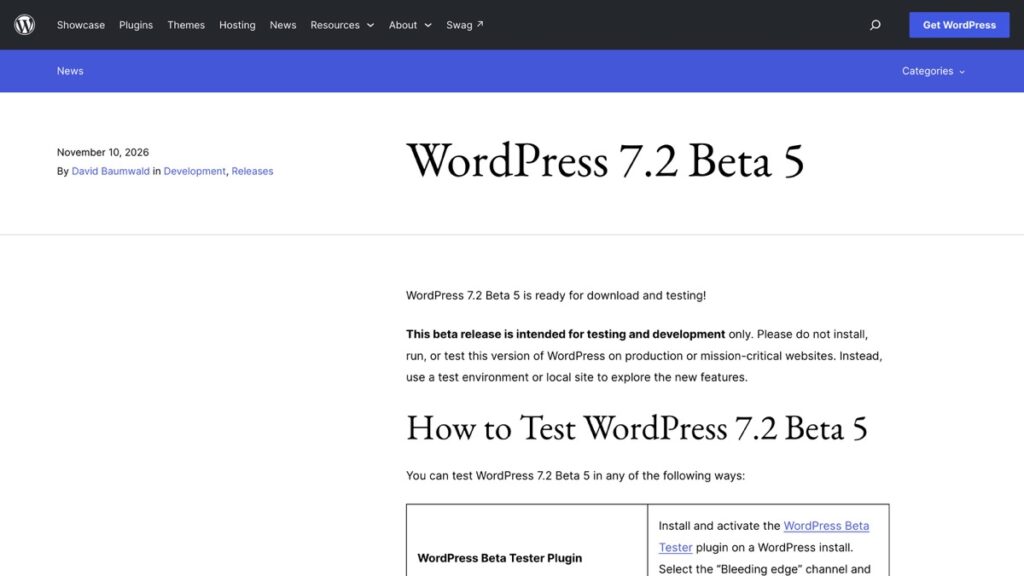
WordPress 7.2 Beta 5 shipped on 10 November 2026 with a note that all known core compatibility issues with PHP 8.6 are resolved. Core is ready. Your theme, your plugins and your host’s default PHP version are the parts nobody has checked yet.
2 Dates Sit Inside the Next 4 Weeks
The two dates run in the opposite order to how most people plan an update. A PHP release changes the thing your site runs on. A WordPress release changes the thing that runs on it. If your host moves to PHP 8.6 on 19 November and your theme is not ready, nothing in WordPress core will save the site.
| Date | What happens | Who controls it |
|---|---|---|
| 19 November 2026 | PHP 8.6 is scheduled for release | Your host, on its own timetable |
| 8 December 2026 | WordPress 7.2 final release is scheduled | You, through the update button |
| Any day now | Beta 5 and the release candidate appear in the Beta Tester plugin | You, if you opt in |
The WordPress announcement is explicit that the beta is for test environments and should not run on a production or mission-critical site. That warning is worth keeping in view, because the temptation with a date three weeks out is to click the button and find out.
Check 1: Which PHP Version Are You Actually On
Read the version the server reports rather than the one your host advertises. The steps for checking and changing PHP cover the two places that matter, the host panel setting and the served header.
A site on 8.5 today has one upgrade to survive. A site still on 8.1 or 8.2 has a host that is already behind, and the 8.6 date is not your problem yet, because your host has not even reached 8.3. That distinction saves a week of worry, and it also tells you which host question to ask.
Check 2: Test the Plugins, Not the Core
The WordPress post says the compatibility work covers WordPress itself, and then asks site owners to verify every plugin and theme separately. That sentence is the whole task. Core is a solved problem in this release. Everything you installed is not.
List what you run and sort it by who maintains it. A plugin updated in the last month probably has a developer watching 7.2 and PHP 8.6. A plugin last updated three years ago is the one that will fatal on the new PHP, and the fix is a replacement rather than a support request. The four checks before installing a plugin work in reverse as a list of what to audit on the way out.
Check 3: Run It on a Copy First
Copying a live site to a test install is now a plugin with a button. The three checks before you copy a site with Reprint cover the version mismatch that catches people, which is running the copy tool on a site whose PHP differs from the target.
The test that matters is the boring one. Load the homepage, open a post, submit the contact form, log in, and open the block editor on a page with a table and a list. If those five things work on the copy, the update is low risk. If the editor loads but a table block renders empty, you have found the thing that would have cost you an evening.
Check 4: Restore a Backup Before You Need One
An update that goes wrong is only recoverable if the backup is complete. What a backup has to hold when a host deletes 189 files is the list to check against. The test is a restore of one file into a scratch directory. A green tick on the backup dashboard says the job ran, and it says nothing about whether the files come back.
While you are in there, note that a cache layer will hide a failed update for a few minutes. The five cache layers to clear in order is the sequence to run before you conclude anything is broken.
What 7.2 Changes and What It Leaves Alone
Three things in the Beta 5 notes are worth knowing before 8 December. WordPress will email you when an application password is created, which closes a hole where a stolen login could quietly mint an API credential. Keyboard navigation in the admin toolbar is improved. And Visual History gets accessibility work, which matters if you hand a site to someone who edits with a keyboard.
The fourth item is the new default theme, Ipsum. It only affects a site running a default theme. A site on a commercial theme or a child theme will not see it, and the release notes for Ipsum are about accessibility and reduced-motion support rather than layout changes.
Beta 5 also fixed MP3 upload compatibility and permission handling for Notes reactions. Neither is a reason to update or to wait. Both are the kind of detail that shows a release is in the polishing stage, three weeks out from a final date.
This site runs WordPress 7.1.4, the 28 October maintenance release, according to the generator tag in its own source. Between that and 7.2 there is nothing unusual, which is the point. Most sites go wrong because a plugin was abandoned, or the host moved PHP without saying so, or the backup was never tested. None of those failures happen on the day of the update. They are waiting there for it.
Source: the WordPress 7.2 Beta 5 announcement, published on 10 November 2026, and the 7.2 release schedule. More WordPress care posts are on the hub, and the migration checklist covers the DNS order if you move hosts in the same window.