WordPress 7.2 lands on 8 December 2026 with a new address on your site, and it is switched on before you see it. A request to /random/ sends the visitor to one randomly picked post. Nothing in the dashboard turns it off, and most site owners will find out about it from an analytics report or a client asking what the odd link is.
I checked my own install this morning. It runs WordPress 7.1.5 and /random/ answers 404, which is correct today. After the update that URL starts redirecting without anyone touching a setting for it.
What /random/ does
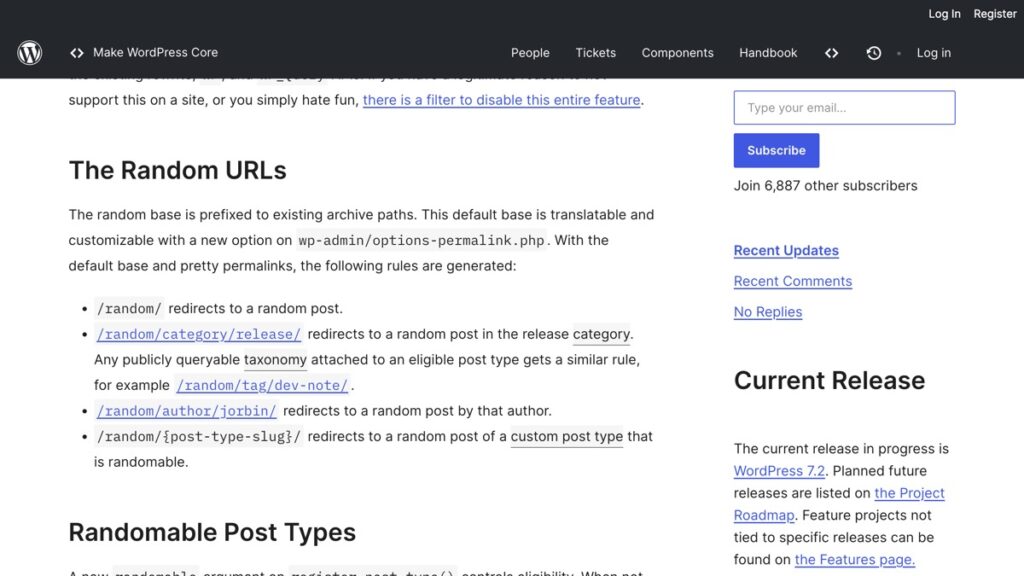
A request to example.com/random/ redirects the visitor to one randomly selected published post. The feature is built on the rewrite, WP and WP_Query code WordPress already uses for archives, so it behaves like a category page that returns one entry instead of ten. It ships enabled.
The design is written up in a developer note on the Make WordPress Core blog, dated 5 November 2026. The post is chosen by the main query, ordered randomly and limited to one row, with three callbacks running only for random requests. In plain terms, the database rolls the dice and hands back a single post.
4 addresses it creates
The plain base is only the first one. WordPress prefixes the same base to existing archive paths, so a site with pretty permalinks gets all four of these.
| Address | What the visitor gets |
|---|---|
/random/ | Any random post |
/random/category/release/ | A random post in that category, or in any public taxonomy attached to an eligible post type |
/random/author/jorbin/ | A random post by that author |
/random/books/ | A random entry of a custom post type that allows it, using the post type slug |
Several write-ups this week said the address cannot be changed. The base can be, through a new field on the permalinks screen under Settings. What you cannot do from the dashboard is switch the feature off. On a Hindi or Marathi site that difference matters, because the base is translatable and should read in the site’s own language rather than in English.
Which post types get picked
A new randomable argument on register_post_type() decides eligibility. Leave it unset and it is true for any post type that is publicly queryable and has an archive. Among the built-in types, posts are randomable while pages and attachments are not.
That default is the whole story for most sites. A portfolio, a testimonial type or a case study type registered by a plugin with an archive is eligible unless the developer wrote the exception in.
The part that matters for search
A post type you deliberately keep out of your menus can still be reached through /random/. If a plugin registers testimonials as a public type with an archive, entries nobody can find by clicking through the site become reachable from one short URL, even where an SEO plugin has set them to noindex. That is the check worth running before 8 December.
Search Engine Journal’s 21 November roundup reports that the development code sends a 302 with an X-Robots-Tag: noindex, follow header on the redirect, and does not send that header on the post the visitor lands on. Read that as intent. Keep /random/ out of the index, leave the destination alone. The destination was an ordinary indexable post before, so I do not expect this to create an indexation problem on a normal blog.
What it does change is reachability and reporting. A URL that returns a different post each time it is called cannot be tracked as a page, so it will never show up in a report as a landing page with a stable click count. If you want to know whether anyone uses it, look in your server logs for requests to the base itself.
How to turn it off
One filter does it. The developer note is explicit about the result. No random rewrite rules are generated, the random base field disappears from the permalinks screen, and the random query variable is ignored.
- Open File Manager or SFTP and go to
wp-content. If there is no folder calledmu-plugins, create it. - Create a file inside it called
disable-random.php, starting with the opening PHP tag. - Add the line below and save.
add_filter( 'wp_enable_random_content_redirect', '__return_false' );There is no activation step. Files in mu-plugins load automatically, which is why this is the right place for a small site-wide rule and the wrong place for anything you want to switch off later from the plugins screen.
3 checks before 8 December
- List every custom post type on the site, then mark the ones that are publicly queryable and have an archive. Those are the ones entering
/random/. - Decide whether the address should stay in English. On a multilingual site, set the base from the permalinks screen in the site’s main language.
- Try 7.2 on a copy of the site, not on the live one. The release candidate is for testing, and WordPress’s own announcement says so.
If you run a shop or a membership site, the second check is the one that bites. Product and course entries are usually public types with archives, so a random redirect will happily drop a reader on a discontinued product or a course that closed for enrolment two years ago.
The timing to plan around is small. WordPress 7.2 is scheduled for 8 December 2026, and most hosts push minor and major releases within days of the final tag. The URL will be live on your site before anyone from your side has read the note. If you would rather not have it at all, the filter above takes two minutes and removes it completely.
The timing and the PHP version question sit in Before WordPress 7.2 Lands on 8 December, Run 4 Checks. The theme change is separate and covered in WordPress 7.2 Ships 1 Bare Default Theme and a 50-Pattern Flagship.
If you set noindex on that post type already, read 4 Checks Before You Add Noindex to a Page, because a noindex on an entry does not stop it being chosen. More of this work sits in the WordPress Care section of the site.
- 3 WordPress 7.1.5 Flaws That Need No Login to Exploit
- 4 Checks Before You Add Noindex to a Page
- 3 Checks When a Scheduled WordPress Post Does Not Publish
Sources: the Make WordPress Core developer note of 5 November 2026, the WordPress 7.2 Release Candidate 1 announcement of 17 November 2026, and Search Engine Journal’s SEO Pulse roundup of 21 November 2026.