Google published the exact referrer values that Search, Discover and Google Images send when a reader clicks through to a site. The page went up on 12 November 2026 and sits in Search Central under monitoring and debugging. Search Engine Journal reported it on 14 November 2026. If your analytics has ever shown fewer Google sessions than Search Console shows clicks, this is the list to check your filters against.
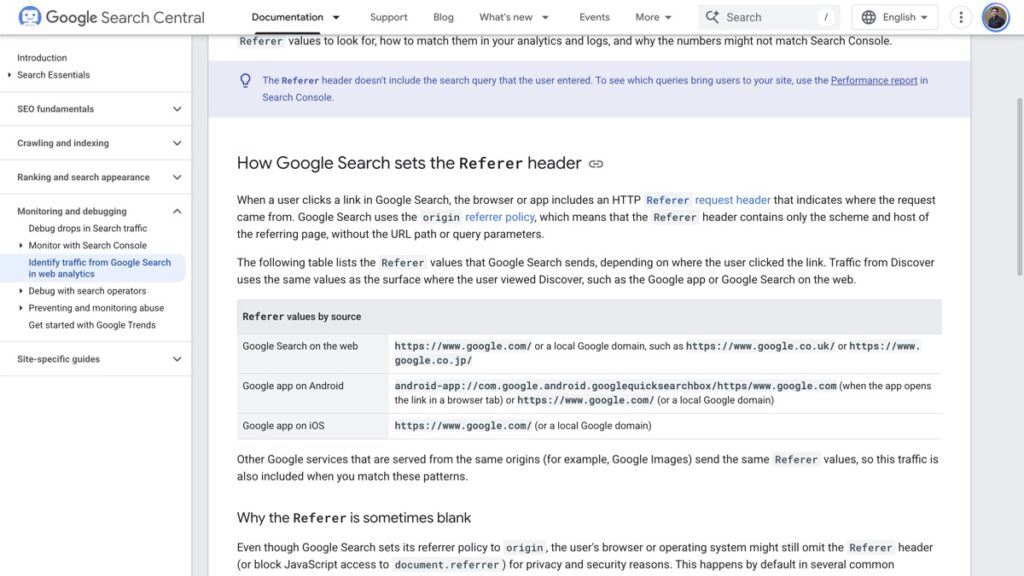
The 3 referrer values Google tells you to match
| Where the click started | Referer value sent |
|---|---|
| Google Search on the web | https://www.google.com/ or a local domain such as https://www.google.co.uk/ |
| Google app on Android, link opened in a browser tab | android-app://com.google.android.googlequicksearchbox/https/www.google.com |
| Google app on iOS | https://www.google.com/ or a local domain |
Search uses the origin referrer policy, so the header carries only the scheme and the host. The path, the query parameters and the search words themselves never arrive. That is why Google points anyone who wants the query to the Performance report in Search Console, where the query data actually lives.
Two things follow from the table. Discover sends the same values as the surface it was read on, so a google.com referrer cannot tell you whether the click came from a search result or from a feed. Google Images sends the same values too, because it is served from the same origins.
Why a Google visit can arrive with no referrer
A missing header looks like a broken tag and usually is not. Google’s own page lists the cases where the browser or the operating system drops it:
- Private browsing modes and anti-fingerprinting protections built into the browser.
- Opening a search result in a new tab, in some browsers.
- Moving from a native mobile search widget into an external browser.
- Visitors running privacy extensions or strict browser settings.
The same paragraph on the page adds that JavaScript tracking may not log every visit because of consent choices, privacy settings and ad blockers. A tracking script that never runs cannot record a session, however the referrer arrived.
Question 1, is this visitor really from Google Search
Most analytics tools recognise these values and file the visit as organic search. When Google traffic turns up as referral or direct, the page gives three suspects in your own setup. Custom channel rules, referral exclusions and filters can all reclassify a visit after the fact.
That is worth an hour of work on any account with a long history, because a referral exclusion added for a payment gateway can quietly swallow a source pattern later. The check is to open the channel rules and read them for anything matching google.com.
Question 2, why a log file overcounts Google
A server log records every request with a referrer, including the request for the image, the stylesheet and the script. For those, the referrer is your own page URL, not Google. Count only the requests for the landing pages themselves and the extra rows disappear.
This is the single most common reason a log-based report disagrees with booking data. The visits are real requests, they are just not visits.
Question 3, why the numbers will never match Search Console
Google is direct about this. The page says the two systems will not line up, and it names 4 mechanisms:
- Privacy settings, extensions, ad blockers and consent choices block the script or strip the referrer.
- Client-side redirects replace the referrer with your own URL, and a redirect that drops the query string takes gclid with it, while a stricter Referrer-Policy on the redirect can remove the referrer entirely.
- Search Console records a click when someone selects a link, while analytics records a session only after the page loads and the tag runs.
- Search Console counts organic clicks only, while an analytics total may include paid traffic depending on configuration.
Read that list as a measurement boundary rather than a bug. The two numbers answer different questions, one about clicks offered and one about sessions recorded.
What the new page leaves unanswered
Two gaps matter for anyone tracking AI surfaces. The first is Discover. Referrer data cannot split Discover from Search, so the Discover report in Search Console stays the only place that does.
The second is AI Mode and AI Overviews. The page was last updated on 12 November 2026 and does not cover either, and the standard Performance report counts clicks from both without a search appearance type that separates them. That reporting gap is the same one behind the AI Mode ads expansion, where the ad clicks arrive without a labelled source.
There is a third, smaller gap. As of 13 November the page does not mention the google.com/goto redirect links that appeared in results, which Search Engine Journal reports that DataForSEO dates to late August 2026. If your logs show goto paths, the published list is not the whole story yet.
3 moves to make this week
First, match the referrer values in whatever you use to read logs, and filter out asset requests before you count anything. Second, read your channel rules and referral exclusions for google.com patterns, and remove the ones that were added for an unrelated reason. Third, put Search Console clicks and analytics sessions side by side for the same 7 days and treat the gap as the size of your measurement error.
The gap is the number to know. It stops a drop from being read as a traffic collapse in the week a consent banner shipped, and it stops a win from being claimed off one referrer pattern.
Two related checks are worth doing in the same sitting. AI referrals miss 4 kinds of visit in GA4 for the same structural reason, and the 4 checks for crawled but not indexed start with the same question about which system recorded what.
The habit that makes all of this useful is harder than the setup. Most SEO tests cannot fail, and a report that compares two numbers without naming what would prove it wrong is one of them. A referrer list at least tells you what a correct match looks like.
Google’s page is at Identify Google Search traffic in your web analytics or server logs. The search and SEO hub collects the rest of these checks, including 3 ways to spot 2 pages fighting for one query.