Google crawled the page, read it, and left it out. That is a judgement about how useful the page looks next to everything else Google already holds, and submitting the URL again does not change the judgement. Four checks find the cause, and the first one is usually the answer.
What the status actually means
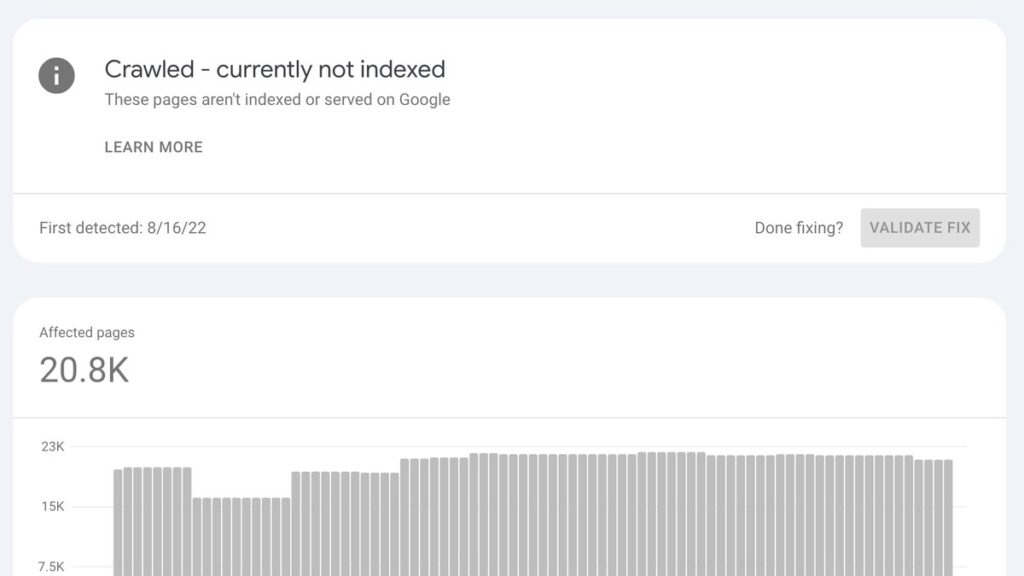
The status means Googlebot fetched the page, parsed it, and chose not to add it to the index. Google’s own help page calls it a common message that does not necessarily point to a fault, so the job is to work out whether this page was left out for a reason you would agree with.
The page indexing report in Search Console says the URL “was crawled by Google but not indexed”, and adds that Google “doesn’t index all pages across the web”. Both halves matter. The first half rules out a crawl block. The second half means the answer is often that Google has enough already.
Crawled and discovered fail for different reasons. Crawled means Googlebot arrived and made a decision. Discovered means Google knows the URL exists and has not fetched it yet, usually because the crawl was rescheduled. Treating the two as one problem sends people off to rewrite pages that nobody has read.
Crawled, discovered, duplicate and alternate
Four statuses in the report get confused with each other, and each one asks for different work. The table sets out what Google says about each, and what that leaves you to do.
| Status | What Google says | What to do |
|---|---|---|
| Crawled – currently not indexed | Fetched, then not added to the index | Judge the page against what already ranks for the query |
| Discovered – currently not indexed | Found, not fetched yet, crawl rescheduled | Wait, then look at server response time and internal links |
| Duplicate without user-selected canonical | Google picked a different URL as canonical | Set a canonical, or merge the two pages into one |
| Alternate page with proper canonical tag | Points correctly at the indexed canonical | Nothing |
Match your page to a row before touching the copy. A duplicate needs a canonical, not a rewrite. A discovered page needs to be fetched at all, which is a host problem before it is a content problem.
The 4 checks, in order
Each check is cheaper than the one after it, so running them out of order wastes the most expensive work first. Start with the page, then move outward to the archive and the domain. The search and SEO hub collects the posts where I have run checks like these against real sites.
- Another page of yours already answers it. Two URLs on the same question means Google indexes one and files the other. Rewrite one of them around a different question, or merge the two and redirect.
- Somebody types this question into Google. A page written because it felt useful gets crawled and dropped. Check the phrase in a keyword tool before spending an hour on the opening paragraph, because a page with no demand cannot be indexed into demand.
- Nothing links to it. An internal link is how a page gets read a second time. When I audited my own archive in October 2026, close to half the posts had no inbound internal link at all, which is a tidy way to make good writing invisible.
- The domain has a problem bigger than the page. Junk URLs, thin tag archives and old paths that answer 200 with the homepage all take attention away from the work you want found. The good page pays for the mess.
The first two checks are about the page. The last two are about everything around it, which is why a rewrite sometimes leaves the status exactly where it was. Two more checks here approach the same question from other angles, in how 5 rank trackers handle poisoned Google results and why a test that cannot fail proves nothing.
The legacy URLs that outlive the page
Old installs leave addresses that never die. A WordPress site that was once compromised answers a thousand junk paths long after the spam is gone, and every one of them returns a 200, so Google keeps spending time there. In October 2026 I redirected 125 dead legacy URLs to the hubs that matched their subject.
The redirect was not the point. A URL that answers 200 with your homepage is a page Google has to evaluate, and each one competes for the same crawl attention as the post you published on Friday. Cleaning that pile is slow, boring, and it is what freed the site to be judged on its real pages. The plumbing keeps moving while the rules stay put, which was the whole story in Google’s Indexing API losing its approval step in October.
Google documents the responses it understands in its guidance on the page indexing report, and the redirect itself is covered in the same set of pages. A 410 and a 301 both stop the clock. The 200 does not.
Where Request Indexing fits
The button inside URL Inspection asks Google to look again. It does not argue the case, and it does not move a page past a decision Google has already made, which is why it so rarely changes this particular status.
Use it once, after the fix, then leave the URL alone for a fortnight. Pressing it every morning is the most common way to feel busy about a page that has not changed by a single word.
What to check first on Monday
Open the report, filter it to the pages you would put in a sales deck, and take the newest one. Then count the internal links pointing at it, and count the other pages that answer the same question.
If the link count is zero, the page has not failed a quality test. Nobody introduced it. Fix that before you touch a sentence, because a link is a five-minute job and a rewrite is a week, and the five-minute job is the one that gets the page read again.