WordPress 7.2 RC1 shipped on 17 November 2026, three weeks before the final release on 8 December. There is nothing new to explore in it. The release is a list of fixes, which makes it the version worth testing on a copy of your site this week rather than on launch day.
I read the release candidate announcement and pulled out what it actually names. The post leads with six Trac tickets closed between 10 and 17 November 2026, plus five block editor pull requests. Below is what changed, what I would test, and the one fix that affects a post I published on 22 November.
What RC1 changes
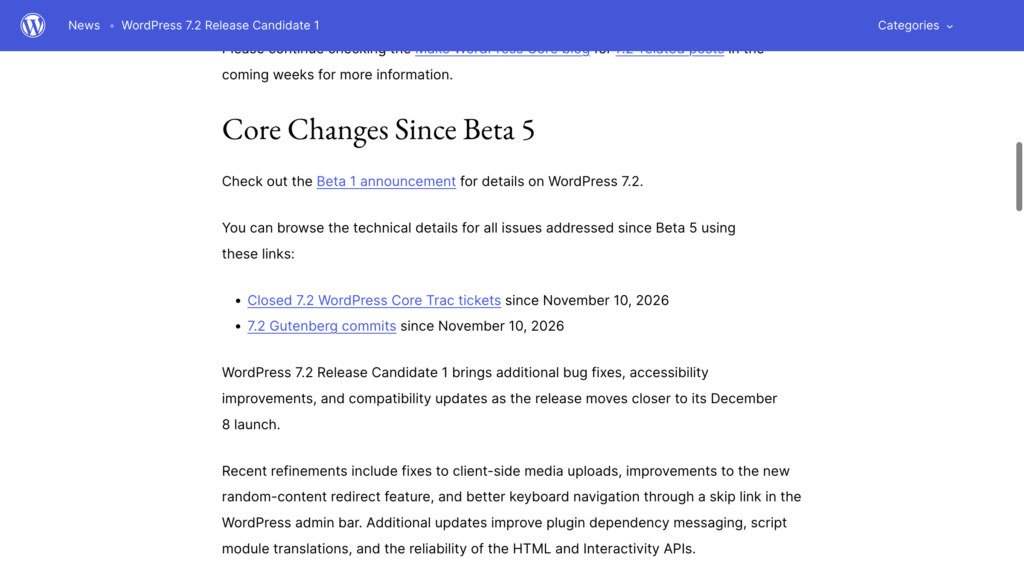
The announcement describes RC1 as additional bug fixes, accessibility improvements and compatibility updates. Those are its words, and they set the size of the release. Beta 5 went out on 10 November 2026. RC1 closed out the week after it and fixed the things testers hit in that window.
| Area | What the notes say changed |
|---|---|
| Media | Fixes to client-side media uploads, plus faster media and image processing |
| Random redirects | Improvements to the new random-content redirect feature |
| Admin bar | Better keyboard navigation through a skip link |
| Plugins | Clearer plugin dependency messaging and smoother installation |
| Translations | Fixes to script module translations |
| APIs | Reliability fixes for the HTML API and the Interactivity API |
| Block editor | Duplicated block content, iOS keyboard interactions, revision previews |
The 4 fixes I would test first
Testing a release candidate is not about clicking every screen. Four things in this list touch work that happens every week on a normal site, so they are where a broken build costs you a morning.
- Drop an image into the editor and watch for the upload finishing on its own. Client-side media uploads got fixes, and that is the path most people use without noticing it. If a thumbnail stalls at 90 per cent in the editor, it is a candidate bug.
- Open a random post URL and load it twice. The random-content redirect feature was adjusted after Beta 5, so the redirect is the thing to re-check, not the setting screen.
- Tab into the admin bar from the front end. The skip link now has better keyboard navigation. Press Tab once and see whether focus lands somewhere visible instead of disappearing.
- Duplicate a block, then open revision previews. Duplicated block content and revision previews both drew fixes. Revisions are the one screen nobody opens until a client asks what changed.
The random redirect changed again
On 22 November I wrote about the random redirect feature because it ships on by default and most site owners will not know it exists. RC1 then refined it, which is the normal life of a new feature in its first cycle. The setting has not moved. The behaviour under it has.
That matters if you already followed my filter advice and turned it off. Your filter still works, and you can leave it. The point of re-testing is for anyone who kept the feature on, because they are running code that changed this week.
What the notes do not answer
Three questions come up every release and none of them are in the announcement. Whether a specific page builder is compatible by 8 December is a question for that page builder. Whether your host has tested RC1 is a question for your host. Whether your theme’s custom fields survive is a question only a staging copy will answer.
The notes do give plugin and theme authors a deadline, and it is a concrete one. They ask authors to finish testing and change the “Tested up to” line in their readme to 7.2. That line is the only public signal you get before launch, so it is worth reading on the plugins you depend on. If a plugin you rely on still reads 7.1 in December, you have your answer about when to update.
My plan for the next three weeks
I run the same sequence every major release. Take a staging copy, install RC1 on it with the beta tester plugin set to the Beta/RC stream, and walk the four tests above. Then read the “Tested up to” line for every plugin that touches content or checkout. Then wait for the final package instead of running a release candidate on a live site, because the notes say plainly not to.
The thing I am watching is PHP 8.6 compatibility, which is listed among the improvements rather than announced as a feature. A PHP bump is the failure that looks like a plugin problem and turns out to be the runtime. If your host moves PHP in the same month, test the two together rather than one after the other.
If you only do one thing, do the readme check. It takes twenty minutes, it needs no staging site, and it tells you which plugin will be the reason your December update goes badly. The rest of the list can wait for the release.
Also read:
- WordPress 7.2 Adds /random/ On By Default and 1 Filter Turns It Off
- Before WordPress 7.2 Lands on 8 December, Run 4 Checks
- WordPress 7.2 Ships 1 Bare Default Theme and a 50-Pattern Flagship
Everything else I check before a WordPress update sits on the WordPress care hub.