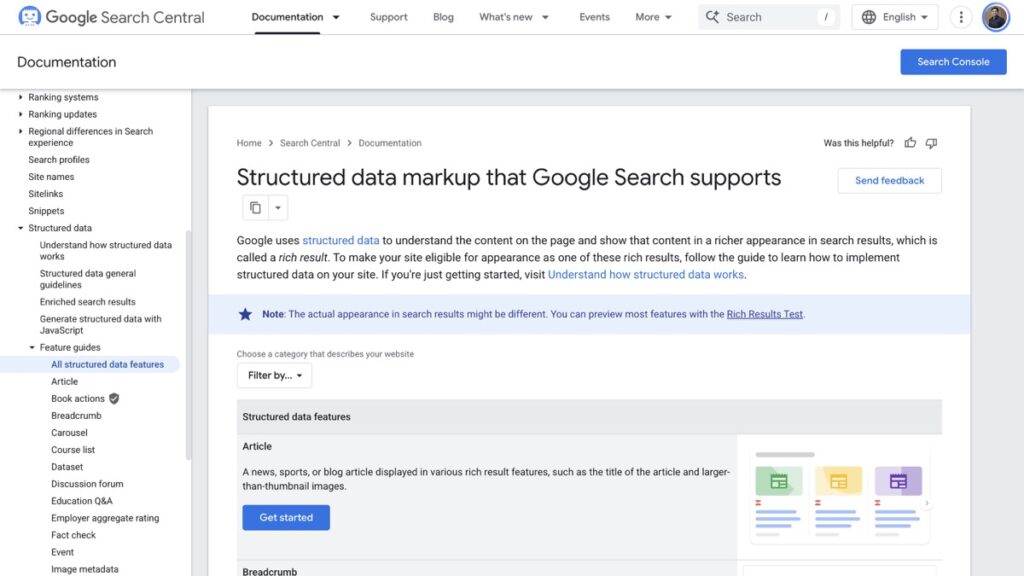
Google’s Article documentation no longer names a single required property. Opened on 15 November 2026, the page says there are no required properties and that you should add the properties that apply to your content. The four that used to sit at the top of my own checklist, headline, image, datePublished and author, are now listed among the recommended ones.
So the useful question changed. It is no longer whether your page is valid. Five properties are worth the effort because each one changes something a reader can see, and the rest of the list is dead weight for a blog.
Article Markup Now Has No Required Properties
The page still ties Article to three schema.org types, Article, NewsArticle and BlogPosting, and it still lists seven recommended properties. Nothing in the list is mandatory. Google’s exact words are that you should “add as many recommended properties that apply to your web page”.
That is not an invitation to skip the work. A page with no author and no image still has to rank on the strength of its text alone. What changed is that the markup is now graded on what it adds rather than on whether it passes a required-field check.
| Property | What changes in the result | Status in the doc |
|---|---|---|
| headline | The title Google reads for the article | Recommended |
| image | Which picture travels with the link | Recommended |
| author and author.url | Who the article is credited to, and where that person exists | Recommended |
| datePublished | Whether a date appears at all | Recommended |
| dateModified | Which date appears when there are two | Recommended |
Headline, Image and Author Do the Visible Work
Headline and image decide what the link looks like before anyone clicks it. The doc warns that long headlines get truncated on some devices, so the useful habit is to keep the headline the same as the visible title and let it end before it stops making sense.
The image guidance is the part people skip. Google recommends at least 50,000 pixels when you multiply width by height, and it asks for 16×9, 4×3 and 1×1 versions where you have them. A 1200×675 featured image clears that floor on its own. A logo or a caption screenshot does not, because the doc asks for an image that represents the article.
Author Markup Fails on the Smallest Detail
Author is where most sites lose the benefit without noticing. The doc is specific on four points. Give each author its own entry rather than one string with two names in it. Use Person for a person and Organization for a company. Put nothing but the name in author.name, so no job title, no honorific, no publisher name. And point author.url at a page that proves the person exists.
That last one is the practical test. If the author URL goes to a 404 or a category archive, the markup is claiming an identity the site cannot back up.
Breadcrumb, Organization and Profile Page Are About the Site
These three are not article markup, and they are the ones that survive a redesign. Breadcrumb shows the path above the result instead of the raw URL. Organization carries the logo and legal name into knowledge panels and attribution. Profile page marks up the person or company page that the author links to.
For a one-person site the combination is worth doing once. Organization goes on every page through the theme or an SEO plugin. Profile page goes on the author archive so the author.url in every article has somewhere real to land. Breadcrumb is generated by most SEO plugins already, and the check is whether it appears in the page source rather than whether the plugin has a toggle.
Types a Blog Will Never Qualify For
The search gallery lists 25 features and most of them need a business type you do not have. Adding the markup does not create eligibility.
- Recipe, Vacation rental, Course list and Job posting need a page that genuinely offers that thing.
- Product and Review snippet need a price, availability or a rating you collect yourself.
- Event needs a real date and place, and the markup expires the moment it passes.
- Dataset, Math solver and Education Q&A serve specialised sites, not a marketing blog.
There is a second reason to leave them out. The doc states plainly that Google does not guarantee any feature that consumes structured data will appear in results. Markup makes a page eligible. It does not buy placement.
How to Check What a Page Actually Emits
Read the page, not the plugin settings. I pulled the source of one post on this site today, 968, published on 14 November 2026. It emits one JSON-LD graph containing BlogPosting, WebPage, Person and BreadcrumbList. The BlogPosting node carries headline, image, datePublished at 13:06:24 with a +05:30 offset, dateModified nine seconds later, articleSection set to Anime, author as a Person named Vira pointing at the author archive, publisher, description and mainEntityOfPage.
Two details in that output are worth copying. The headline arrives as the title plus the site name, which is the pattern most SEO plugins use by default, and it stays inside the truncation risk the doc warns about. And dateModified is nine seconds after datePublished because the post was created and then touched once, which is honest rather than staged.
For verification, Google’s own sequence is the Rich Results Test on the URL, then URL Inspection in Search Console to confirm Googlebot sees the same markup, then a sitemap so the page is found in the first place. That order starts with the page and ends with discovery, which is the reverse of how most people work through it.
What Structured Data Cannot Fix
Markup does not rescue a page Google has not indexed, and it does not fix two pages chasing the same query. Those are separate problems with separate checks. I keep the reading order for a crawled but not indexed page separate from anything schema related, because the fixes do not overlap at all.
The same goes for a test that produces a pass with no consequence. A test that cannot fail proves nothing, and running a structured data validator that only checks syntax is that kind of test. The useful check is whether the feature appears, which needs a live result and a few days.
If the sitemap is the part that is broken, the Indexing API change is worth reading before you file a bug with your host. And if the goal is to be quoted by an AI answer rather than to earn a rich result, markup is a small part of it. Query fan-out explains why one page per keyword stopped working, which no amount of schema addresses.
Sources: Google’s Article structured data documentation and the structured data gallery, both opened on 15 November 2026. The search and SEO hub collects the rest of this series.