Moving to a CDN can raise crawler traffic to your server on the first day instead of lowering it. Google explained why in a Search Central post on 11 November 2026, and the answer is uncomfortable. A fast edge tells Google your host is healthy, so crawl demand gets more room, and an empty cache sends every one of those extra requests straight back to your origin. Three steps stop that from becoming a slow site.
Why the crawl rate goes up the day the CDN goes live
Google’s crawlers watch how fast and how consistently your server answers. Slow answers cause a slow crawl. Fast answers look like new hardware, so the crawl capacity limit rises while demand stays the same. Google calls that limit hostload, and a CDN edge answering in milliseconds reads exactly like an upgrade.
The catch sits in the cache. A new CDN starts cold, so the first request for every URL at every edge location is a miss that walks back to your origin. Visitors cluster on the homepage and a few popular articles, which warm quickly. Crawlers do the opposite and walk your whole URL inventory, which is the set that was never cached.
| What you see | Why it happens | What to do about it |
|---|---|---|
| Origin logs fill with Googlebot an hour after cutover | Fast edge responses raised the crawl capacity limit | Expect it, and warm the cache before cutover |
| Origin CPU spikes on pages you never linked | Cold cache means every new URL is a miss | Fetch your most-crawled URLs through the CDN first |
| Googlebot gets a CAPTCHA or a 403 | Blanket bot protection treats verified crawlers as bots | Allow verified bots before any challenge rule |
| Origin still overloaded after a day | Caches are warming faster than the box can answer | Return 429 or 503 for a few hours, not a week |
Step 1: allow verified bots before you change DNS
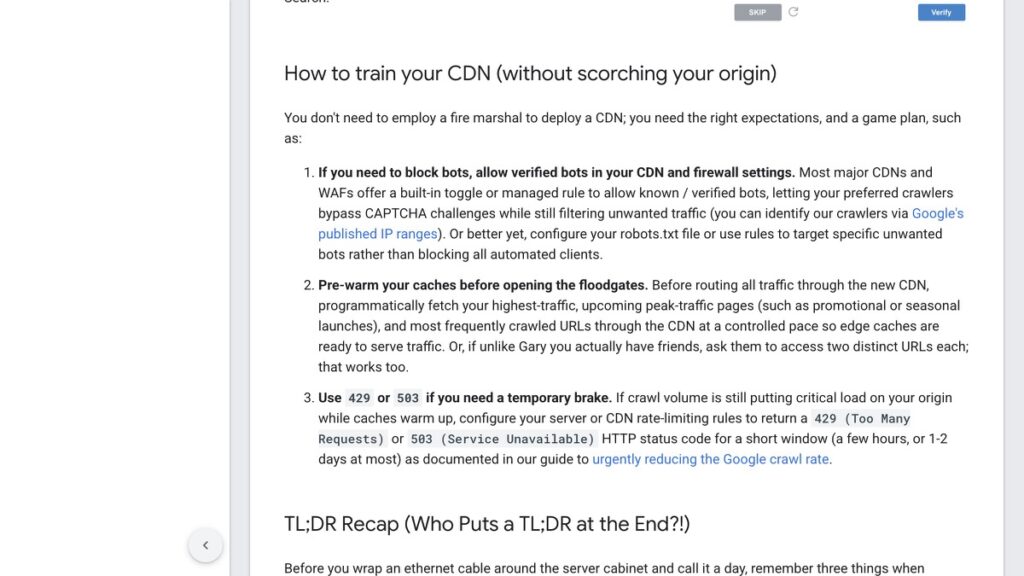
Google asks for the exemption first, and it is the step people skip because the problem has not appeared yet. Most CDNs and firewalls ship a managed rule or a toggle that lets known and verified bots through, so Googlebot can fetch the page instead of answering a challenge it cannot pass. Google publishes its crawler IP ranges for the ones that need an allowlist.
Targeted rules beat a blanket switch. Block the crawler you do not want by name in robots.txt or in a firewall rule, and leave the rest of the automated traffic alone.
Step 2: warm the cache with a URL list, not with a homepage visit
Before traffic moves, fetch the pages that matter through the CDN at a controlled pace. That means your highest-traffic pages, anything about to launch, and the URLs you know Google fetches most often. Each fetch you make deliberately is one the crawler does not have to make through a cold edge.
The list is easy to build for a WordPress site. Take the top 20 URLs from Search Console by clicks, add the sitemap’s newest 20, and add the sections you know Google recrawls daily. That is 40 to 50 requests, which takes minutes and covers most of the first day’s misses.
Step 3: use 429 or 503 as a brake for hours, not a wall for weeks
If the origin is genuinely struggling while caches warm, Google says to return 429 or 503 for a short window, a few hours and at most one or two days. Both tell Google to slow down without telling it the page is gone. A 503 during maintenance is a different animal from a 404, which is why a 503 during a PHP patch does not cost you the rankings the way a soft 404 does.
What you do not want is a two-week 503 while somebody gets round to a bigger server. Google will treat that as a site in trouble, and the recovery is not instant.
The mistake that takes you out of Search
Turning on blanket bot protection because the origin graph looks frightening is the expensive move. Without an exemption, that rule treats every automated request the same, and Googlebot fails a CAPTCHA every time. Google’s own description of the result is blunt: the crawler backs off and pages start dropping out of Search. The traffic spike you were trying to stop was the thing keeping you indexed.
What this looks like on a small Indian origin
Most sites I work on run on one shared server with LiteSpeed in front, not a fleet of app servers. On that setup the cold-cache week is the only risky week, because the box that serves visitors is the same box that answers every cache miss. Two things help. The first is a real page cache that survives the CDN cutover, which is the argument in the five cache layers worth clearing in order. The second is doing the move in the same quiet window you would use for DNS, which is why a migration checklist puts DNS last.
There is a version of this move that is mostly paperwork. Pre-warm 50 URLs, allow verified bots, keep the origin’s own cache working, and watch origin response time rather than crawl volume for the first 48 hours. If response time stays flat while crawl volume doubles, the CDN is doing its job.
Check the origin before you blame Googlebot
One diagnostic settles a lot of arguments. Look at time to first byte from the origin, not through the CDN, for the same URL the crawler is fetching. If the origin takes two seconds, the CDN is not your problem and neither is the crawler. The checks for pages that are crawled and dropped start with the same instinct, which is to prove the page can be served quickly before rewriting a word of it.
Google’s post on moving to a CDN is worth reading in full before a cutover, and the crawl budget documentation explains the capacity limit that causes the spike. The WordPress care hub collects the rest of the server-side checks I run before touching a live site.