A noindex line does exactly what it says, which is the problem. Google’s documentation is blunt: once Googlebot reads the tag, “Google will drop that page entirely from Google Search results, regardless of whether other sites link to it”. Four checks decide whether the line works at all, and whether it was the right line to write.
Each row of the table below is one failure mode, with the test that rules it out. Three of them come from the tag itself and one comes from the wait after it.
| Check | How to test it | What a fail looks like |
|---|---|---|
| The page is crawlable | Fetch the URL, then read robots.txt for a matching Disallow | The page keeps appearing in results weeks after the tag went in |
| The tag is on the indexed URL | View source of the exact URL in Search Console | The tag sits on a variant, a page 2 or a mobile URL |
| Canonical was the right tool | Compare the two URLs and what they are for | The indexed page disappeared instead of merging |
| The next crawl has happened | URL Inspection, last crawl date | Impressions continue after the tag, so nothing is wrong yet |
A noindex that skips any of the four is a tag Google reads and ignores, and the page stays where it was.
What noindex does, and the 2 ways to set it
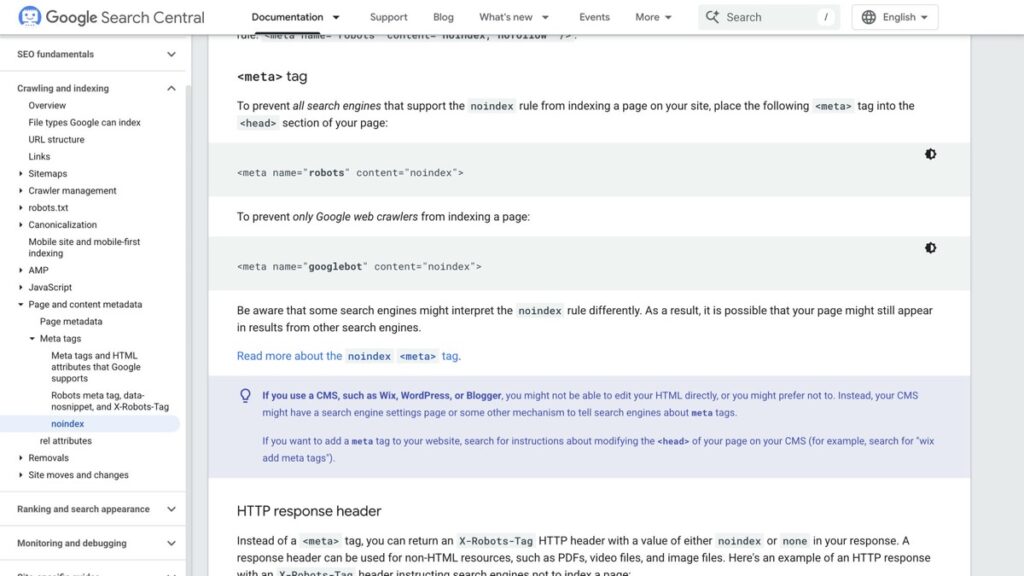
noindex removes one URL from search results, permanently, for as long as the tag is there. It is not a query filter and it does not reduce a ranking. The page leaves. Google accepts it through a meta tag in the head of the page, or through an X-Robots-Tag HTTP header, and the header is the only route that works for a PDF, an image or a video file.
The third route people try does not exist. Google’s doc says specifying noindex in robots.txt is not supported, which is worth knowing before you spend an hour on a rule that will never be read as one.
Check 1: the page has to be crawlable
This is the check that fails most often. Google’s own warning is direct: for noindex to be effective, “the page or resource must not be blocked by a robots.txt file, and it has to be otherwise accessible to the crawler”. If the URL is disallowed, Googlebot never fetches the page, never reads the tag, and the page can still turn up in results because other pages link to it.
The test takes thirty seconds. Fetch the URL with a plain request and read the response headers and the source. Then open robots.txt and look for a Disallow line that matches the path. A noindex on a URL that robots.txt blocks is a contradiction, and the block wins because it is the only one Google sees.
The same applies to a page that answers with a redirect. Google evaluates the tag on the URL it finally settles on, so a noindex on a URL that 301s to a live page protects nothing at all. The redirect is the stronger signal, and the target keeps its own indexing rules.
Check 2: the tag is on the URL that gets indexed
A noindex applies to one URL. Put it on page 2 of a paginated archive and page 1 stays indexed with the same posts on it. Put it on the mobile variant and the desktop URL keeps its place. The check is to view source of the exact URL that appears in Search Console, not the URL you typed, and to confirm the tag is inside the head section of the served HTML.
A tag written in after the page loads is the version most likely to be missed. Google’s documentation puts the tag in the page head, and a crawler that reads the raw HTML never sees an injected one. If a tag manager or a script is adding your robots meta, move it into the template and test again.
Check 3: noindex is not a canonical tag
Two URLs with the same content need one of them chosen, and noindex is the wrong tool for that job. Google’s canonical documentation says it plainly: “We don’t recommend using noindex to prevent selection of a canonical page within a single site, because it will completely block the page from Search.” A rel=canonical merges the two pages. A noindex deletes the weaker one and throws away whatever it earned.
The two rules also fight each other when both are present on one page, since one asks Google to keep a URL and the other asks it to drop the URL. Where the cannibalisation checks show two pages chasing one query, canonical is the fix. noindex is for a page that should not exist in search at all.
Check 4: the removal waits for the next crawl
Adding noindex does not pull a page out of results on the day you add it. Google’s debugging note is that a page still showing up is “probably because we haven’t crawled the page since you added the noindex rule”. Depending on how important the page is, that revisit can take months. The URL Inspection tool requests a recrawl, and the Removals tool is the route when something has to go today.
That lag is why noindex makes a bad emergency switch. Two weeks later the page is still in results, somebody decides the tag did not work, and the tag gets removed just before the crawl that would have acted on it. Check the last crawl date before you change your mind.
Where noindex earns its place on a live site
An archive that lists the same posts a hand-built page already lists is the clean case. I checked this blog’s category archive with a plain request on 17 November 2026 and it returns meta robots with follow and noindex. The archive lists the same posts the anime hub lists, so the hub is the page that competes for the topic and the archive stays out of the index. The follow part is deliberate, because the links inside the archive still pass something.
That is the shape to copy: one indexable page per topic, built by hand, with the thin duplicate kept out of the index but still crawlable. Once a page is noindexed, the only way to know Google agreed is the crawl date, and a page that Google crawled but did not index is a different problem with a different fix. The search and SEO hub collects the indexing work in one place, and the older note on the Indexing API approval step is the reminder that submitting a URL is a separate lever from keeping one out.
Run check 1 before the other three. Most noindex tags that did nothing were never crawled, and one curl plus one look at robots.txt rules that out in half a minute.